In this blog, I will try to show examples of utility types that we can use in the TypeScript programming language to facilitate common, frequently used type conversions.
The blog content will be as follows respectively. Have a good reading!
- Awaited<Type>
- Record<Keys, Type>
- Pick<Type, Keys>
- Omit<Type, Keys>
- Partial<Type>
- Required<Type>
- Readonly<Type>
- String Manipulation Types
Awaited<Type>
This type unwraps the type resolved in the await operations of asynchronous functions or in a Promise.
type AwaitedType = Awaited<Promise<number>>;

let anyNumber: AwaitedType;
// typeof anyNumber = number
Record<Keys, Type>
This utility can be used to map properties of two different types. In the example below, the keys of the StudentName type are mapped as keys and StudentGrades as value type, and a new object type is created.
type StudentName = 'mustafa' | 'kemal';

interface StudentGrades {
  midterm: number;
  final: number;
  result: string;
}

const students: Record<StudentName, StudentGrades> = {
  mustafa: { midterm: 76, final: 60, result: 'pass' },
  kemal: { midterm: 10, final: 20, result: 'fail' },
};
Pick<Type, Keys>
It allows a new type to be created by selecting the desired keys, i.e. Keys, from the Type element. In the example below, a new type is created using only the name and page properties in the Book interface.
interface Book {
  name: string;
  page: number;
  summary: string;
  readed: boolean;
}

type NameAndPage = Pick<Book, 'name' | 'page'>;

const anyBook: NameAndPage = {
  name: 'Lord of The Rings: The Fellowship of the Ring',
  page: 423,
};
Omit<Type, Keys>
It’s the opposite of Pick. Creates a new type by removing Keys from the entire Type. In the example below, a new type is created by extracting summary from the Book interface properties.
interface Book {
  name: string;
  page: number;
  summary: string;
  readed: boolean;
}

type BookInfo = Omit<Book, 'summary'>;

const anyBook: BookInfo = {
  name: 'Lord of The Rings: The Fellowship of the Ring',
  page: 423,
  readed: true,
};
Partial<Type>
Allows all features of Type to be made optional. For example, below, the Partial<Book> utility type is used to update only the summary property of the Book interface.
interface Book {
  name: string;
  page: number;
  summary: string;
  readed: boolean;
}

function updateBook(book: Book, fieldsToUpdateBook: Partial<Book>) {
  return { ...book, ...fieldsToUpdateBook };
}

const book: Book = {
  name: 'Lord of The Rings: The Fellowship of the Ring',
  page: 423,
  summary: 'Lorem',
  readed: true,
};

const updatedBook = updateBook(book, { summary: 'Lorem Ipsum' });
Required<Type>
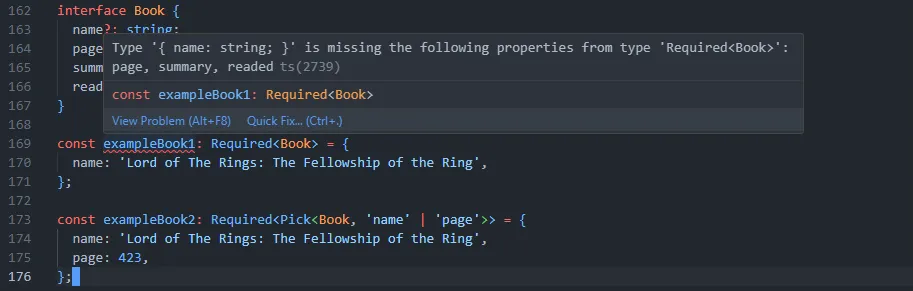
Required type is the opposite of Partial type. Used to indicate that each of the Type properties is required. In exampleBook1, all properties of the Book interface are mandatory and it gives an error because properties other than name are not specified. In the exampleBook2 example, only the name and page properties (selected with Pick) are stated as required fields.
interface Book {
  name?: string;
  page?: number;
  summary?: string;
  readed?: boolean;
}

const exampleBook1: Required<Book> = {
  name: 'Lord of The Rings: The Fellowship of the Ring',
};

const exampleBook2: Required<Pick<Book, 'name' | 'page'>> = {
  name: 'Lord of The Rings: The Fellowship of the Ring',
  page: 423,
};
Readonly<Type>
The readonly utility type makes all properties of Type readonly, preventing them from being changed. In the book example below, the interface properties can be printed to the console for review, but cannot be changed.
interface Book {
  name: string;
  page: number;
  summary: string;
  readed: boolean;
}

const book: Readonly<Book> = {
  name: 'Lord of The Rings: The Fellowship of the Ring',
  page: 423,
  summary: 'Lorem Ipsum',
  readed: true,
};

console.log(book.name);

book.name = '';
book.summary = 'Lorem';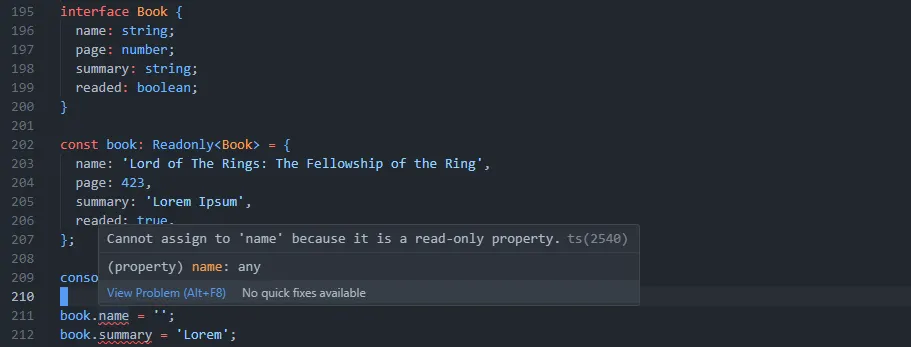
String Manipulation Types
- Uppercase<StringType>
- Lowercase<StringType>
- Capitalize<StringType>
- Uncapitalize<StringType>
String manipulation can be done with these utility types. We can examine a few examples below.
type City = 'ankara' | 'new york' | 'london';

type UppercaseCity = Uppercase<City>;

type LowercaseCity = Lowercase<City>;

type CapitalizeCity = Capitalize<City>;

type UncapitalizeCity = Uncapitalize<City>;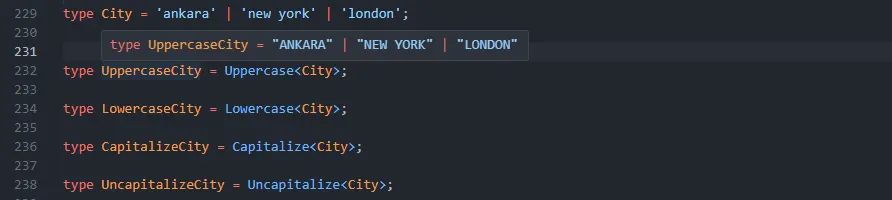
I hope you enjoyed and found it interesting. See you in my next blog! 👋